Introducing Travel Rule Suite by AMLBot

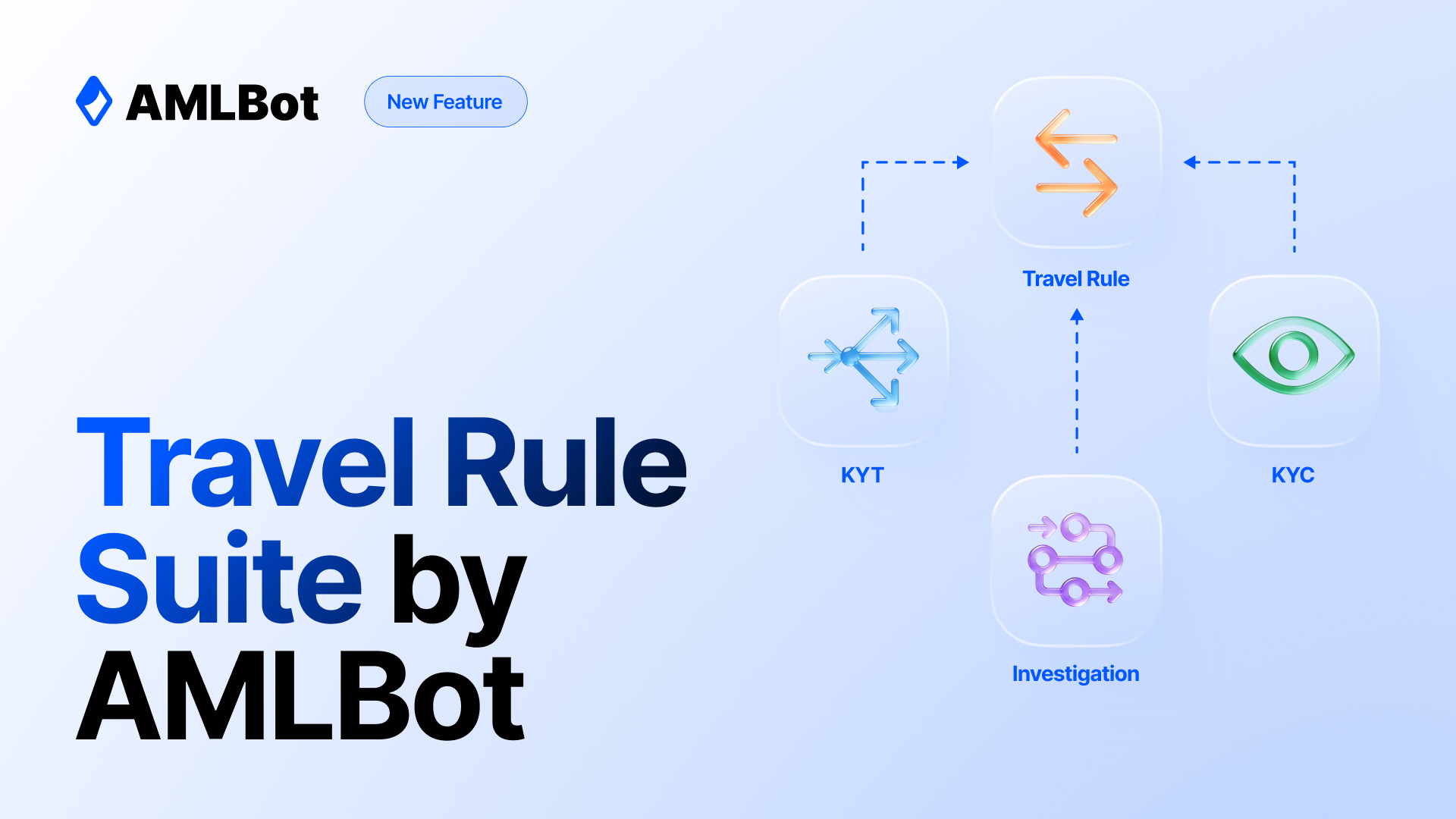
AMLBot has launched Travel Rule Suite, bringing KYC/KYB, KYT, and Travel Rule workflows together with a single login and one support team. In its 2026 survey, the FATF reported that 83% of responding jurisdictions had passed legislation implementing the Travel Rule, up from 73% a year earlier. Your team needs to verify the customer, identify the counterparty VASP, and securely exchange the required data.
Why the Travel Rule Is Harder Than KYC
The Travel Rule, based on FATF Recommendation 16, requires VASPs to share customer data with the counterparty VASP no later than the transfer itself: before it or at the same time. In the outgoing workflow described below, the request goes to the counterparty before any funds are sent.
KYC and sanctions screening happen inside your systems. Meeting Travel Rule requirements also depends on counterparties, and adoption varies across jurisdictions.
We explained the rule itself in FATF Crypto Travel Rule Explained and broke down the main challenges in Crypto Travel Rule Implementation: Key Challenges for Crypto Businesses.
Why Separate Vendors Slow Compliance Down
When KYC, address screening and Travel Rule checks use separate vendors, your team has to work across three systems for each transfer.
- Three integrations, three contracts, and three support desks. Each system has to be connected, paid for and updated when the rules change.
- Scattered data. Customer records sit in one system, address risk reports in another and communication with the counterparty in a third. Before an audit, someone has to put it all together by hand.
- An unknown counterparty. If your Travel Rule tool can't identify who owns an address, there is no one to send the request to.
What Travel Rule Suite Covers
The Travel Rule Suite includes:
- Support for Travel Rule protocols.
- A VASP directory.
- Self-hosted wallet ownership verification.
- Incoming and outgoing transfer workflows.
- Jurisdiction-specific rules and thresholds.
How Travel Rule Suite by AMLBot Works
Below is an outgoing transfer example using the Beneficiary Portal. You create the transfer via API and track its status in your dashboard.
- Verify your customer. KYC/KYB confirms who your customer is before a transfer. The request needs both parties' data in IVMS101 format. AMLBot requires the sender's name and at least one identifier: residential address, national ID number, customer ID, or date of birth.
- Identify the counterparty. Before you send, AMLBot attempts to identify which VASP owns the destination address, and KYT shows the risk of that address. You can also check an address in advance, without creating a transfer.
- Exchange Travel Rule data. The counterparty gets an email with a link to the Beneficiary Portal. They don't need an AMLBot integration or account to respond. They accept or decline the request and see your customer's data only after a one-time code check. If they don't respond, automatic reminders follow.
- Complete the transfer. Once the transfer is approved, you send the transaction and attach its hash via API. Every step is recorded in an audit trail, and your dashboard tracks data completeness under the EBA Travel Rule guidelines, EBA/GL/2024/11.
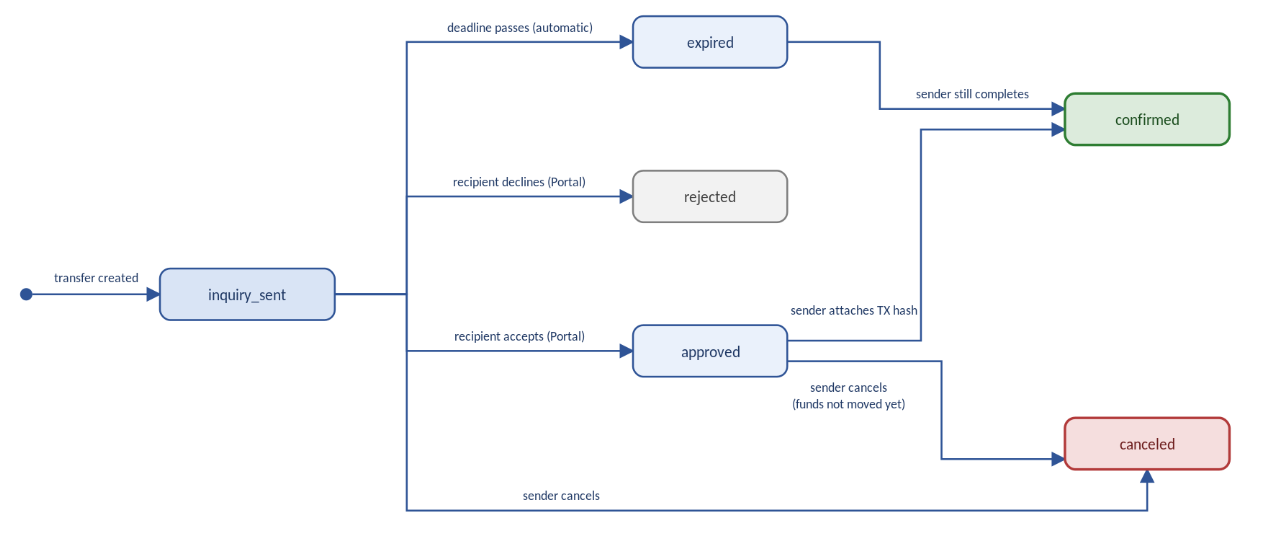
If the counterparty doesn't respond by the deadline, the transfer moves to expired. The sender can still attach the transaction hash via API, moving the transfer to confirmed.
You can cancel a transfer while it is in inquiry_sent or approved and the funds haven't moved yet. If you set up a webhook, every status change reaches your system with a signature.
Want to See It on Your Transfers? Try the Travel Rule Suite Free for 10 Days.
Example: One Transfer From Start to Finish
Say a customer of an exchange withdraws 5,000 USDT to an external address. Here is how the transfer works through the Beneficiary Portal.
- The exchange creates the transfer via API: address, network, amount and both parties' data in IVMS101 format.
- AMLBot identifies that the address belongs to another VASP and emails it. The transfer status is inquiry_sent.
- Four hours pass with no answer, so the counterparty gets its first reminder.
- The counterparty opens the link and confirms the address belongs to its customer. The transfer moves to approved, and a webhook notifies the exchange's system. The counterparty then enters the code from a second email and sees the sender's data.
- The exchange sends the transaction and attaches its hash. The transfer closes as confirmed, and its full history stays in the transfer card.
What Your Counterparty Sees
The counterparty responds through the Beneficiary Portal using a link in an email. To send the request, AMLBot must identify the VASP and have a verified contact on file.
- Transfer Details. On the first step, the counterparty sees the amount, network, address and deadline. It confirms the address belongs to its customer or declines the request. Your customer's name is not shown at this step.
- Customer data after acceptance and a code check. First, the counterparty accepts the request, then enters a code from a second email. The code is valid for 10 minutes, with up to five attempts. If the request is declined, the data is never revealed.
- Automatic reminders. If the counterparty doesn't respond, it gets up to three reminders: after 4, 24, and 48 hours.
- Limited access. The link works for 72 hours after it is first opened. Once the transfer is confirmed, canceled, rejected or expired, the same link no longer shows the data.
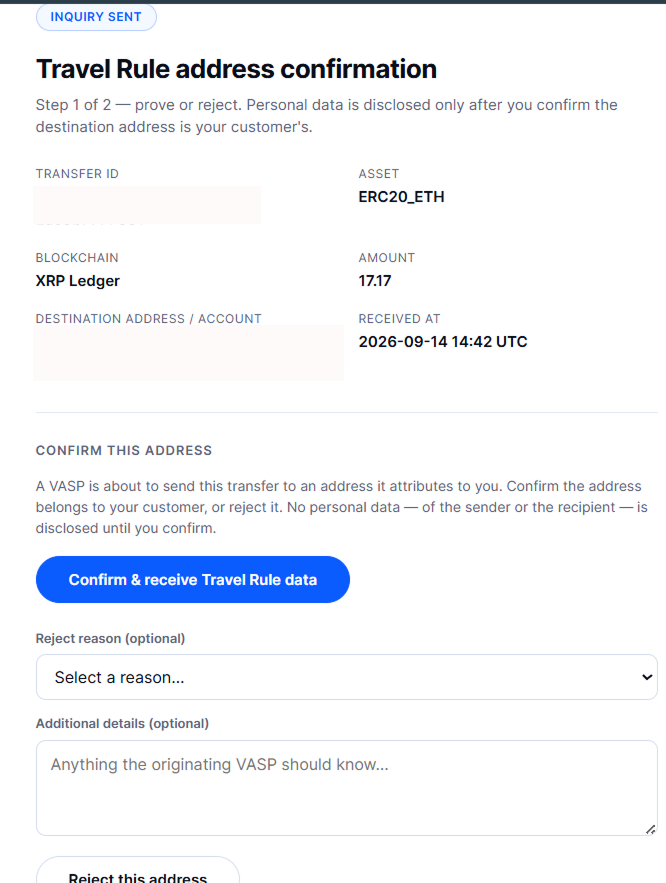
Step 1: The counterparty confirms or rejects the address. No personal data is shown yet.
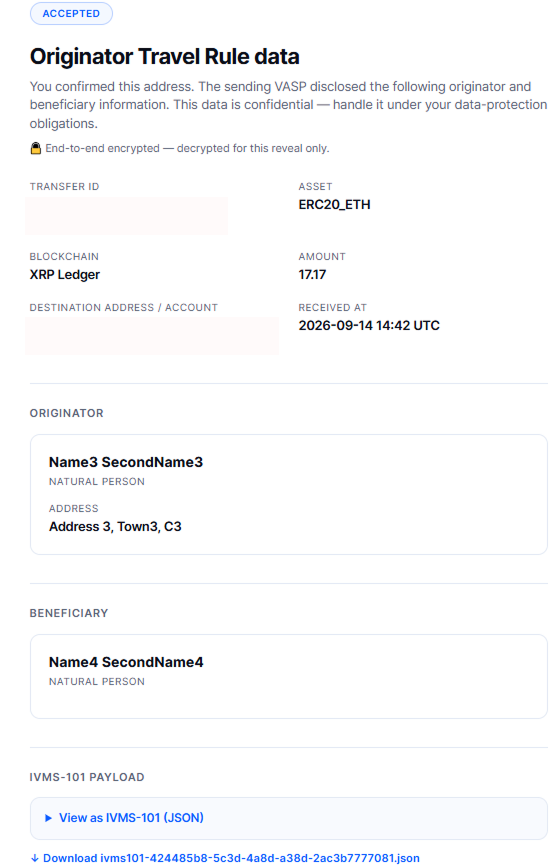
Step 2: After the one-time code check, the counterparty can view the sender's data.
Audit Trail and Reporting
Every decision on a transfer is recorded: who made it and when. Before an audit, you don't need to rebuild the history from emails and spreadsheets.
- Transfer History. Each transfer card shows every status, both parties' data, comments and attachments.
- Email Archive. A hidden copy of every notification sent to a counterparty goes to an audit mailbox you choose. One-time code emails are not copied.
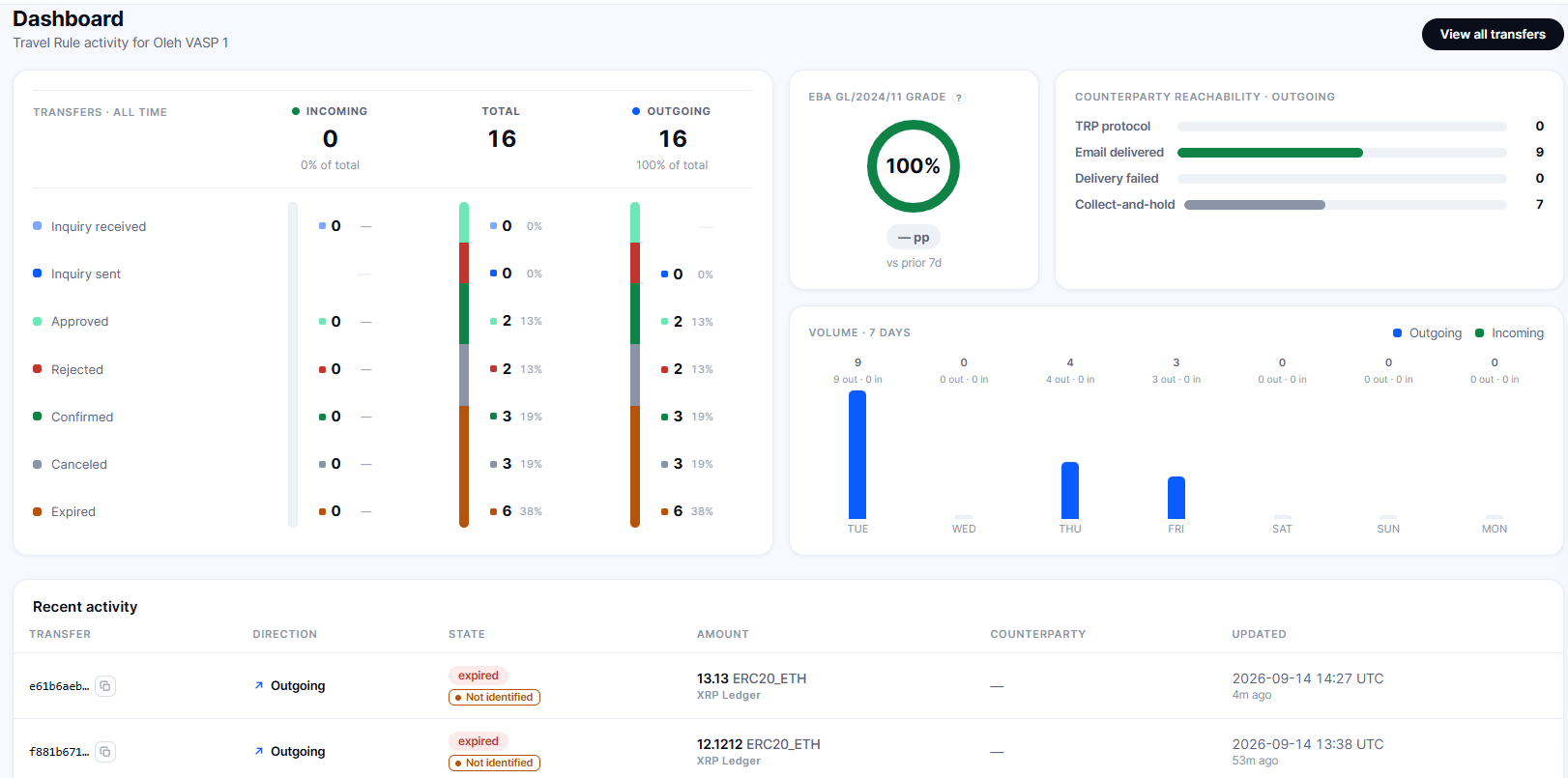
- Data Completeness. Your dashboard shows the share of transfers with a complete IVMS101 data set.
- Counterparty Reachability. See how many requests were delivered, how many could not be delivered and how many are on hold because the counterparty could not be identified or has no contact on file.
In the EU, there is no threshold for transfers between CASPs, so data is required for any amount (our EU Travel Rule guide).
Under the EBA Travel Rule Guidelines, a counterparty identified as repeatedly failing to provide the required information should be reported to the competent authority without undue delay, and no later than three months after identification (para. 74).
The completeness metric helps you identify gaps in your data before your counterparty does.
Your Compliance in One Place
Travel Rule Suite is available alongside AMLBot's KYC/KYB, wallet screening, KYT, and investigation tools, with one login and one support team.
- KYC/KYB. Customer and company verification. Every Travel Rule request needs customer data.
- Wallet Screening. Address risk assessment, with a report that explains why an address is flagged.
- KYT. Real-time transaction monitoring with real-time alerts and behavioral rules.
- Travel Rule Suite. Identifies the counterparty VASP, sends requests, exchanges customer data in IVMS101 format and records decisions.
- Investigations. Tracer and AI Tracer. Tools for tracing the movement of funds within AMLBot.
Customer checks, address risk, counterparty requests and investigations stay with one vendor instead of separate systems. AMLBot has helped 1,000+ crypto businesses across 25 jurisdictions and is ISO 27001 certified.
FAQ
What Is Travel Rule Suite by AMLBot?
Travel Rule Suite is AMLBot's Travel Rule solution. It supports incoming and outgoing transfer workflows, exchanges data with counterparties and keeps an audit trail. You sign in with the same login you use for KYC/KYB and KYT.
Does the Counterparty Need an Integration or an AMLBot Account?
Not when responding through the Beneficiary Portal. The counterparty gets an email with a link and responds on the portal without signing up.
How Does AMLBot Identify the Counterparty VASP?
From the destination address. Before you send, AMLBot tries to identify which VASP owns the address. This doesn't work on every network. You can also check an address in advance, without creating a transfer.
When Does the Counterparty See My Customer's Data?
In the Beneficiary Portal, only after it confirms the address and enters a one-time code from a second email. Before that, it sees only the transfer details: amount, network, address and deadline.
What Happens If the Counterparty Doesn't Respond?
It gets up to three reminders: after 4, 24 and 48 hours. After the deadline, the transfer moves to expired. The sender can still attach the transaction hash via API, moving the transfer to confirmed. You set the response deadline in your dashboard.
What If AMLBot Can't Identify the VASP Behind an Address?
The transfer is still created. Your dashboard shows the reason: the VASP was not identified, or there is no contact on file for it. You then follow your policy.
What Data Format Does Travel Rule Suite Use?
IVMS101. AMLBot requires at least one identifier for the sender: residential address, national ID number, customer ID, or date of birth.
Does Travel Rule Suite Help With the EBA Travel Rule Guidelines?
Your dashboard shows the share of transfers with a complete IVMS101 data set, and every decision is saved in the transfer history. The final compliance decision stays with your compliance team.
How Do I Get Started With Travel Rule Suite?
Leave a request or contact the AMLBot team, and your account manager will set up access. The first 10 days are free. You sign in with the same login as other AMLBot products. API documentation and a Postman collection are available in your dashboard.
Free Business trial
Try AMLBot in your own workflow
Tell us what your business needs, and we’ll set up a free trial with the AML tools that are most relevant to you.
Takes a few quick questions
Your Business trial
Example setup- KYT: Screening, Transaction & Address Monitoring
- KYC / KYB
- AML Tracer
- Travel Rule
Full access to Business mode, set up around your answers